Windows Server 2012 でテキストから URL を取得してファイルのダウンロードをしたかったので作ってみました。
Archive for the ‘Windows Server’ Category
Windows Server 2012 でサポートされる SQL Server について
Windows Server 2012 でサポートされる SQL Server について以下の技術情報があります。
Windows Server 2012 または Windows 8 SQL Server をインストールするときの最低限のバージョン要件
以前は Release Preview の情報だったのですが、RTM の情報に更新されたようですね。
以下のバージョンが Windows Server 2012 / Windows 8 でサポートされるようです。
SQL Server 2005 は非サポートなんですね。
| SQL Sever のバージョン | サポートバージョン |
| SQL Server 2005 | サポートされない |
| SQL Server 2008 | SP3 以降 |
| SQL Server 2008 R2 | SP1 以降 |
| SQL Server 2012 | RTM 以降 |
Windows Server 2012 の SkipRearm について
Windows Server 2012 の SkipRearm について検証しながらまとめてみたいと思います。
Windows Server 2012 で WSFC が構築可能なエディションについて
Windows Server 2012 は今までのバージョンとエディション構成が異なっており、
- Standard
- Datacenter
- Essentials
- Foundation
の 4 種類のエディション構成となっています。
上記の情報に書かれているように
Standard エディションは、Datacenter と同じエンタープライズ クラスの機能を提供します。これらの 2 つのエディションの違いは仮想化権限だけです。
Standard と Datacenter エディションの違いは仮想化のライセンスになります。
そのため、Windows Server 2008 R2 までのエディションによる機能差はなくなっています。
Windows Server 2008 R2 エディションの違い
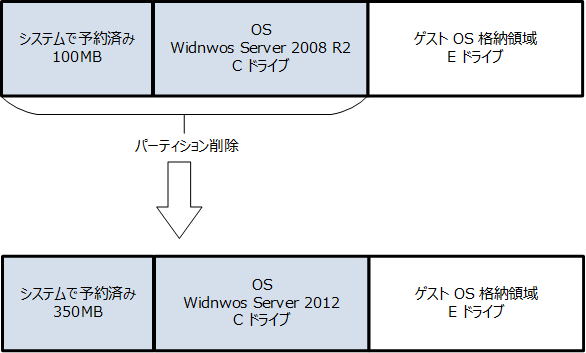
Windows Server 2012 の新規インストールをした場合の Hyper-V 2.0 のゲスト OS のインポート
自宅の検証環境の 1 台は Windows Server 2008 R2 をインストールしていたパーティションを削除して、そのパーティションに対して 2012 をインストールしています。
検証環境の整備
Windows Server 2012 がリリースされたので時間を見て検証環境を整備しています。
その時のメモを。
Windows 8 / Windows Server 2012 のインストール時のプロダクトキーの入力について
Windows 8 / Windows Server 2012 はインストール時にプロダクトキーの入力が必要となる場合があります。
プロダクトキーの入力ですが、EI.cfg の有無によって変わってくるようです。
Windows セットアップのエディション構成ファイルとプロダクト ID ファイル (EI.cfg と PID.txt)
# Windows 8.1 / WIndows Server 2012 R2 も同様でしたので文末に追記しました。
Dynamic Quorum による動的な投票数の調整
以前
Windows Server 8 Beta では 2 ノードでノード マジョリティが組める??
Dynamic Quorum と従来型の Quorum Model の切り替え
という投稿を書きました。
Windows Server 2012 の WSFC では Dynamic Quorum (動的クォーラム) という新機能を使用することができます。
この Dynamic Quorum ですが、クラスターのノードの投票数を動的に調整することで、クラスターを起動するために必要な投票を確保するという仕組みになるようです。
今回の投稿ではこの投票数の調整についてみていきたいと思います。
なお、Dynamic Quorum については Windows Server 2012 Failover Clustering Dynamic Quorum を見て勉強しています。
Windows Internal Database のメンテナンス
昨日、facebook で話に上がったのでメモとして。
MBSA と DISM を使用した 2008 R2のパッチ適用
インターネットに接続されていない環境で適用対象となるセキュリティパッチを適用するための方法として、Microsoft Baseline Security Analyzer (MBSA) とオフライン検出用のカタログファイルを使用してリストを作る方法があります。
Microsoft Baseline Security Analyzer 2.2 (for IT Professionals) – 日本語
上級ユーザー向けの新しいバージョンの Windows Update オフライン スキャン ファイル Wsusscn2.cab について
OS のセキュリティパッチに関しては各月のパッチが含まれた ISO が提供されていますので、これを利用するという方法もありますね。
Microsoft ダウンロード センターで入手できる、ISO-9660 DVD5 イメージ ファイル形式のセキュリティ更新プログラム
今回は MBSA と DISM を使用したパッチ適用についてまとめてみたいと思います。