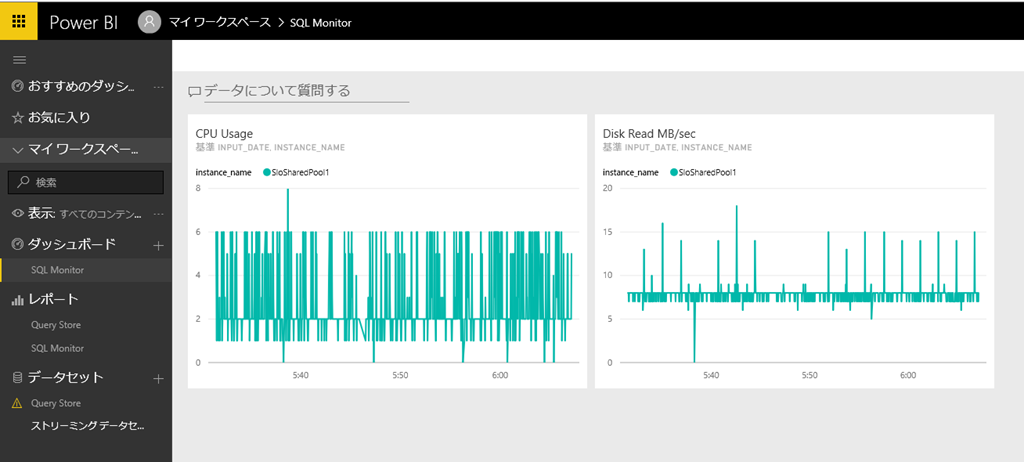
Power BI のストリーミングデータセットは、プッシュ URL に対して、JSON のデータを送ることで簡単にデータを格納させることができます。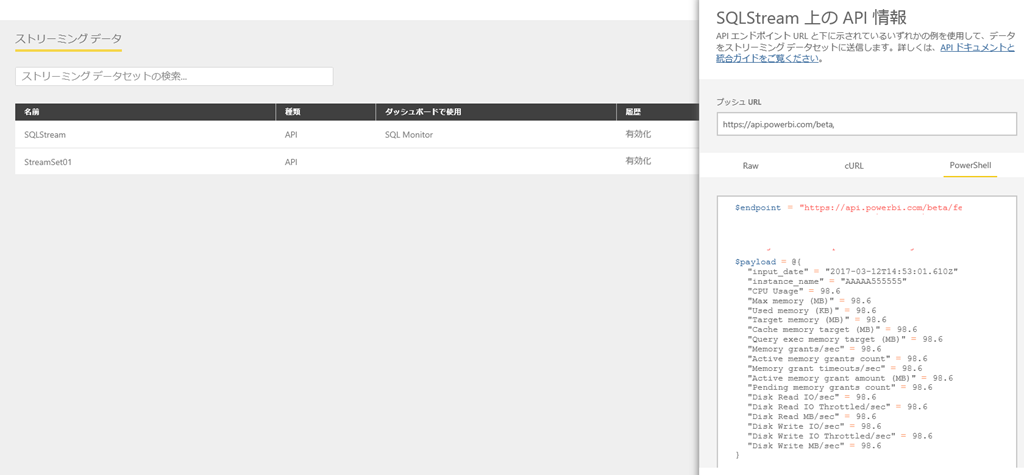
SQL Server / SQL Database 関連の情報を表示させることができるかなと思って、軽く試してみました。
ストリーミングデータセットとしては、以下のような定義を設定しています。
[
{
 "input_date" :"2017-03-12T14:55:06.156Z",
 "instance_name" :"AAAAA555555",
 "CPU Usage" :98.6,
 "Max memory (MB)" :98.6,
 "Used memory (KB)" :98.6,
 "Target memory (MB)" :98.6,
 "Cache memory target (MB)" :98.6,
 "Query exec memory target (MB)" :98.6,
 "Memory grants/sec" :98.6,
 "Active memory grants count" :98.6,
 "Memory grant timeouts/sec" :98.6,
 "Active memory grant amount (MB)" :98.6,
 "Pending memory grants count" :98.6,
 "Disk Read IO/sec" :98.6,
 "Disk Read IO Throttled/sec" :98.6,
 "Disk Read MB/sec" :98.6,
 "Disk Write IO/sec" :98.6,
 "Disk Write IO Throttled/sec" :98.6,
 "Disk Write MB/sec" :98.6
}
]
作成したデータセットに対して、以下のようなスクリプトで定期的にデータを送り続けてみます。
$endpoint = "エンドポイント URL"
$sql = @"
SELECT
    GETDATE() AS input_date,
	instance_name,
	CAST(CAST([CPU usage %] AS float) / CAST([CPU usage % base] AS float) * 100  AS int) AS [CPU Usage],
	[Max memory (KB)] / 1024 AS [Max memory (MB)],
	[Used memory (KB)] / 1024 AS [Used memory (KB)] ,
	[Target memory (KB)] / 1024 AS [Target memory (MB)] ,
	[Cache memory target (KB)] / 1024 AS [Cache memory target (MB)],
	[Query exec memory target (KB)] / 1024 AS [Query exec memory target (MB)],
	[Memory grants/sec],
	[Active memory grants count],
	[Memory grant timeouts/sec],
	[Active memory grant amount (KB)] / 1024 AS [Active memory grant amount (MB)] ,
	[Pending memory grants count],
	[Disk Read IO/sec],
	[Disk Read IO Throttled/sec],
	[Disk Read Bytes/sec] / POWER(1024, 2) AS [Disk Read MB/sec] ,
	[Disk Write IO/sec],
	[Disk Write IO Throttled/sec],
	[Disk Write Bytes/sec] / POWER(1024, 2) AS [Disk Write MB/sec]
FROM
	(
	SELECT
		RTRIM(instance_name) AS instance_name,
		RTRIM(counter_name) AS counter_name,
		cntr_value
	FROM
		sys.dm_os_performance_counters
	WHERE
		object_name like '%Resource Pool Stats%'
	) AS T
PIVOT
(
	SUM(cntr_value)
	FOR counter_name
	IN(
		[CPU usage %],
		[CPU usage % base],
		[Max memory (KB)],
		[Used memory (KB)],
		[Target memory (KB)],
		[Cache memory target (KB)],
		[Query exec memory target (KB)],
		[Memory grants/sec],
		[Active memory grants count],
		[Memory grant timeouts/sec],
		[Active memory grant amount (KB)],
		[Pending memory grants count],
		[Disk Read IO/sec],
		[Disk Read IO Throttled/sec],
		[Disk Read Bytes/sec],
		[Disk Write IO/sec],
		[Disk Write IO Throttled/sec],
		[Disk Write Bytes/sec],
		[Compile memory target (KB)],
		[Avg Disk Read IO (ms)],
		[Avg Disk Read IO (ms) Base],
		[Avg Disk Write IO (ms)],
		[Avg Disk Write IO (ms) Base]
	)
) AS PVT
ORDER BY
	instance_name ASC
"@
while($true){
    $ret = Invoke-Sqlcmd -ServerInstance <インスタンス名> -Username <ユーザー名> -Password <パスワード> -Database <db> -Query $sql
    Invoke-RestMethod -Method Post -Uri "$endpoint" -Body (ConvertTo-Json ($ret | select input_Date,instance_name,"CPU Usage","Max memory (MB)","Used memory (KB)","Target memory (MB)","Cache memory target (MB)","Query exec memory target (MB)","Memory grants/sec","Active memory grants count","Memory grant timeouts/sec","Active memory grant amount (MB)","Pending memory grants count","Disk Read IO/sec","Disk Read IO Throttled/sec","Disk Read MB/sec","Disk Write IO/sec","Disk Write IO Throttled/sec","Disk Write MB/sec"))
    Start-Sleep -Seconds 1
}
SQL Database に対して実際に実行をしてみた結果が以下になるのですが、それっぽいデータは取れていそうでした。