SE の雑記

SQL Server の情報をメインに Microsoft 製品の勉強内容を日々投稿

SQL Data Sync の基本構成について

leave a comment

SQL Data Sync の基本構成について少しまとめてみたいと思います。
今回はオンプレミスの SQL Server と SQL Database 間の同期設定を対象としています。

基本的な情報については SQL データ同期プレビュー が参考になります。
SQL Data Sync は Sync Framework を元に作成されているようですので詳細な動作に関してはこのあたりも確認をしておくとよいかもしれないですね。

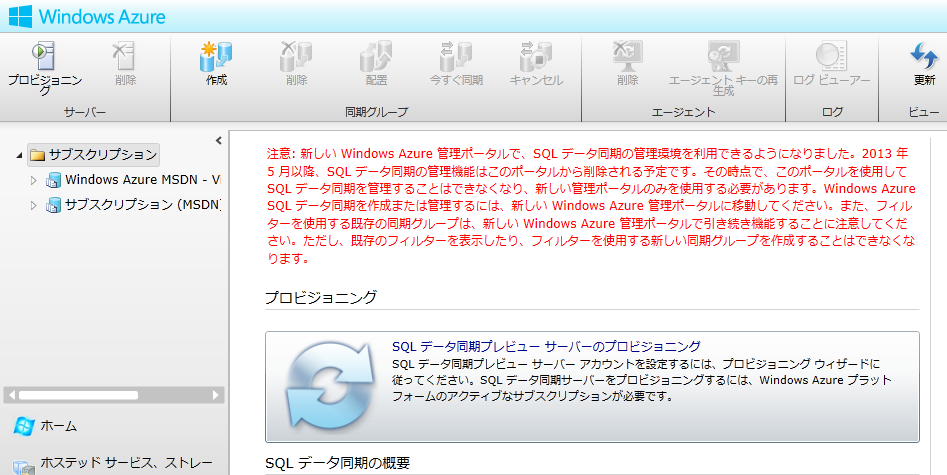
なお、旧ポータルからの操作は 5 月で実施できなくなるようです。
image

フィルターに関しては現状のポータルでは作成できなくなるようですのでこの辺は注意が必要そうですね。


Read the rest of this entry »

Written by Masayuki.Ozawa

5月 12th, 2013 at 9:10 pm

Posted in SQL Azure,SQL Server

Tagged with ,

DACFx を使用した下位バージョンのSQL Server の bacpac の作成

leave a comment

SQL Server のデータベースをパッケージングかするためのフレームワークとして DACFx (Data-Tier Application Framework) があります。

以前、sqlpackage と AzCopy を使用した SQL Database のデータ退避 という投稿を書きました。
データ層アプリケーション (DAC) に関しては SQL Server 2008 から登場したものですが当時は dacpac という定義情報のみを抽出するものでした。

SQL Server 2012 になり DAC BACKPAC というデータを含んだデータ層アプリケーションの抽出が可能になりました。
この機能を使用して、SQL Server 2012 より下位のバージョンの bacpac の作成についてまとめてみたいと思います。

Read the rest of this entry »

Written by Masayuki.Ozawa

5月 11th, 2013 at 6:03 pm

Posted in SQL Azure,SQL Server

Tagged with ,

オブジェクトの情報を取得するテーブル等

leave a comment

たんたかさんの カラム名検索でテーブル検索 を見てなるほどと思ったので少しまとめてみたいと思います。

Read the rest of this entry »

Written by Masayuki.Ozawa

5月 11th, 2013 at 1:26 pm

Posted in SQL Server

Tagged with

AlwaysOn を Azure 上に構築してみる – テストの実施編 –

leave a comment

ここまでで AlwaysOn の環境は構築できましたのでテストの実施方法などを少しまとめてみたいと思います。
Read the rest of this entry »

Written by Masayuki.Ozawa

5月 9th, 2013 at 11:50 pm

AlwaysOn を Azure 上に構築してみる – AlwaysOn の構築編 –

leave a comment

AlwaysOn を Azure 上に構築してみる – WSFC の構築編 – に続いて SQL Server 部分 (AlwaysOn 可用性グループ) の構築をしていきたいと思います。

参考情報としては引き続き
Test Lab: Create an AlwaysOn Availability Group in Windows Azure End-to-End
Tutorial: AlwaysOn Availability Groups in Windows Azure

になります。

Read the rest of this entry »

Written by Masayuki.Ozawa

5月 8th, 2013 at 11:47 pm

AlwaysOn を Azure 上に構築してみる – WSFC の構築編 –

leave a comment

SQL Server 2012 の新機能である AlwaysOn は Windows Azure の仮想マシン (VM : VIrtual Machine) に構築することができます。

Windows Azure で SQL Server AlwaysOn 可用性グループ を作ってみる
Tutorial: AlwaysOn Availability Groups in Windows Azure
HADR Tutorials for SQL Server in Windows Azure VMs

構築できるのは知っていたのですが実際に試したことはなかったので少しまとめてみたいと思います。
まずは WSFC の構築から。

投稿を書いている時点 (2013/5/7) の投稿ですので最新の構築方法では変わっているかもしれません。

Read the rest of this entry »

Written by Masayuki.Ozawa

5月 8th, 2013 at 6:43 am

SQL Server のトレースを XPerf で取得してみる

leave a comment

Windows Performance Analysis Toolkit (WPT) に含まれている XPerf を使用するとトレースデータを取得することができます。
このツールを使用して SQL Server のトレースを取得するための手順を勉強しながら少しまとめてみました。

XPerf に関しては以下の情報が参考になります。
Xperf Command-Line Reference
Troubleshooting SQL Server High CPU usage using Xperf
Identifying the cause of SQL Server IO bottlenecks using XPerf
Diagnose High CPU on Windows with XPerf
Stack Walking in Xperf
WPA とか XPerf とか
第1回 OS機能によるアプリのパフォーマンス測定

起動時の情報を取得する Xbootmgr というツールもあるようですがこれは別の機会に触れればなと思います。
Dipping My Toe Into the Xbootmgr Water
WPA とか XPerf とか
# XPerf だけでなく Xbootmgr も紹介されています。
Windowsの起動が遅いならWindows Performance Toolkitで確認

Read the rest of this entry »

Written by Masayuki.Ozawa

5月 5th, 2013 at 4:04 pm

Posted in SQL Server

Tagged with

SQL Server on Winodws Azure Virtual Machine のメモ

one comment

SQL Server を Winodws Azure Virtual Machine で動作させるときの留意事項などのメモを。

Read the rest of this entry »

Written by Masayuki.Ozawa

5月 5th, 2013 at 1:21 am

SQL Server 2008 R2 / 2012 のスリップストリームメディアのシンプルな作成方法

one comment

SQL Server 2008 以降はスリップストリームインストールがサポートされており、以下のような技術情報も出ています。
SQL Server 更新プログラムのスリップストリーム
SQL Server 2008 のインストールを更新またはスリップストリームする方法
SQL Server 2008 および更新プログラムの一括セットアップ (スリップストリーム セットアップ)

スリップストリームインストールは SQL Server 2008 SP1 からの新機能なので、2008 で実行するセットアップサポートファイルをインストールしてから実行する等の対応が必要になりますが。
SQL Server インストールの新機能

Read the rest of this entry »

Written by Masayuki.Ozawa

5月 4th, 2013 at 5:37 pm

Posted in SQL Server

Tagged with

Windows Azure VM を PowerShell で作成

leave a comment

PowerShell で Azure を操作する際のメモ の続きになります。

Windows Azure VM (仮想マシン) を PowerShell で作ってみたいと思います。

Read the rest of this entry »

Written by Masayuki.Ozawa

5月 2nd, 2013 at 9:14 pm

Posted in Windows Azure

Tagged with ,