Resumable Online Index Rebuild is in public preview for Azure SQL DB でアナウンスされていますが、SQL Database で、SQL Server 2017 で実装される再開可能なオンラインインデックス再構築が、Public Preview ではありますが利用可能となりました。 Read the rest of this entry »
Archive for the ‘SQL Database’ tag
SQL Database の長期保存バックアップで使用した Recovery Service が削除できない場合の対応方法
SQL Database の 長期保存バックアップ は、 Recovery Service 上に取得されます。
この Recovery Service を削除しようとした際に、ポータル上の内容ではすべての設定やコンテナーが存在していない状態でも、削除がエラーになることがあります。
この場合、Azure RecoveryServiceVault can’t be removed? の対応をすると削除ができるようになります。
$vault = Get-AzureRmRecoveryServicesVault -Name "VaultName"
Set-AzureRmRecoveryServicesVaultContext -Vault $vault
$container = Get-AzureRmRecoveryServicesBackupContainer -ContainerType AzureSQL -FriendlyName $vault.Name
$item = Get-AzureRmRecoveryServicesBackupItem -Container $container -WorkloadType AzureSQLDatabase
$availableBackups = Get-AzureRmRecoveryServicesBackupRecoveryPoint -Item $item
$availableBackups
$containers = Get-AzureRmRecoveryServicesBackupContainer -ContainerType AzureSQL -FriendlyName $vault.Name
ForEach ($container in $containers)
{
    $items = Get-AzureRmRecoveryServicesBackupItem -container $container -WorkloadType AzureSQLDatabase
    ForEach ($item in $items)
    {
        Disable-AzureRmRecoveryServicesBackupProtection -item $item -RemoveRecoveryPoints -ea SilentlyContinue
    }
    Unregister-AzureRmRecoveryServicesBackupContainer -Container $container
}
Remove-AzureRmRecoveryServicesVault -Vault $vault
長期保存バックアップで使用しているサイズについても、ポータルから確認できる使用サイズに含まれているようなのですが、この領域を削除するための方法が、現時点のポータルからは用意されていないため、PowerShell を使用して、長期保存バックアップのコンテナーを明示的に削除する必要があるようですね。
これで削除を行えば、Recovery Service 自体も削除できるようになります。
Data Sync 2.0 が Azure Portal から設定できるようになりました
Migrating to Azure SQL Data Sync 2.0 で、2017/7/1 から、Data Sync の設定は Azure Portal からのみになるという記載があったことを思い出し、今どういう状態になっているんだろうと思って、確認をしたところ SQL Database に「別のデータベースに同期」という設定が増えていました。
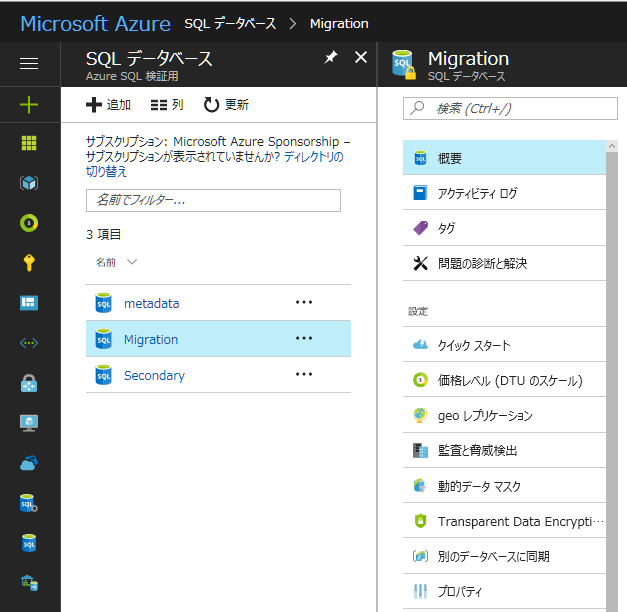
先月の段階で、英語版のドキュメントについては、Data Sync 2.0 対応されていたんですね。
Getting Started with Azure SQL Data Sync (Preview)
制限等については次のドキュメントから確認することができます。
Sync data across multiple cloud and on-premises databases with SQL Data Sync
Read the rest of this entry »
SQL Database で互換性レベル 140 がパブリックプレビューとなりました
Public Preview of Compatibility Level 140 for Azure SQL Database でアナウンスされていますが、SQL Database で互換性レベル 140 がパブリックプレビューとなっています。
少し前から設定できていた気がしなくもないのですが、正式にパブリックプレビューになったのは今回のタイミングなんですね。
Read the rest of this entry »
Standard の Elastic Pool であれば並列クエリが実行できるようになっているようです
先日、Higher database eDTU limits for Standard elastic pools in Azure SQL Database のアナウンスがありましたが、Standard の Elastic Pool の DB 単位の eDTU の上限に変更があり、「200 / 300 / 400 / 800 / 1200 / 1600 / 2000 / 2500 / 3000」を最大の eDTU として選択ができるようになりました。。
プールの eDTU として、3000 まで、以前から対応していましたが、DB 単位の eDTU の最大は今までは 100 eDTU だったものが緩和された形ですね。 Read the rest of this entry »
SQL Database のフェールオーバーグループの設定がポータルから可能になりました
SQL Database の Geo レプリケーションに自動フェールオーバーグループの機能が追加されました で投稿した際は、ポータルからは設定できなかったと記憶しているのですが、本日時点ではポータルから設定できるようになったようです。
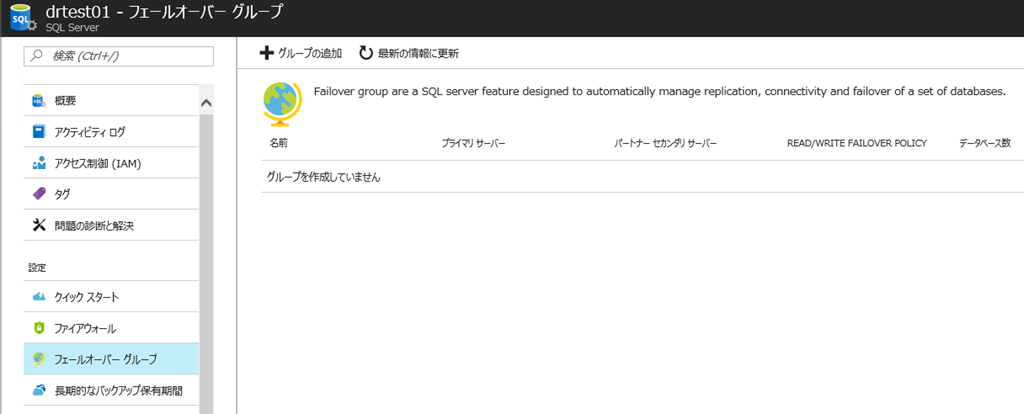
Read the rest of this entry »
de:code 2017 DI02 で使用したリアルタイムダッシュボードの構成
本投稿が公開されているタイミングで、de:code 2017 で まかせて! Azure SQL Database に登壇させていただいています。
この中でデモでお見せした、SQL Database の リアルタイムダッシュボードの構成について説明させていただきます。
Read the rest of this entry »
de:code 2017 DI02 で使用したサンプルスクリプトについて
de:code 2017 の DI02 のセッションでは、いくつかのデモを実施しています。
その際に使用したサンプルスクリプト (PowerShell / SQL) ですが、以下からダウンロードしていただくことが可能です。
DI02 Demo Scripts
お時間の関係で見せられていないデモもあるかもしれませんが、今回のセッション用に作成したものを一通りまとめさせていただいておりますので、ご参考になれば幸いです。
SQL Database の Geo レプリケーションに自動フェールオーバーグループの機能が追加されました
SQL Database の Geo レプリケーションに、自動フェールオーバーグループの機能が新規に追加されました。
Auto-Failover Group capabilities
Azure SQL Database now supports transparent geographic failover of database groups
基本的な動作については de:code 2017 の まかせて! Azure SQL Database で (山本さんが) お見せできるかなと。
Read the rest of this entry »
Build 2017 のキーノートで発表のあった、SQL Server / SQL Database 関連の発表をざっくりと
Build 2017 が始まりましたので、ざっくりと情報をまとめてみようかと。
de:code 2017 のネタ集めとも言います(
大枠の発表については、以下を参照してもらうとよろしいかと。
New innovations at Microsoft Build 2017: Helping developers achieve more
Cloud Platform Release Announcements for May 10, 2017
Serving AI with data: A summary of Build 2017 data innovations
Read the rest of this entry »