Announcing the release of SQL Server Management Studio 22.1 で知ったのですが、SQL Server Management Studio 22 (SSMS 22) で、実行プランを直接 GitHub Copilot チャットに連携して分析する方法が公開されていましたので紹介。
記載されている箇所としては次の内容となります。
Can I attach an execution plan for GitHub Copilot to analyze?
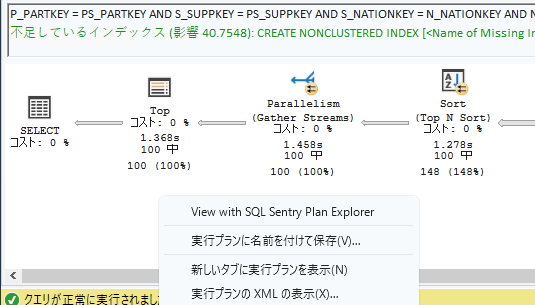
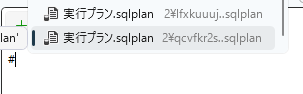
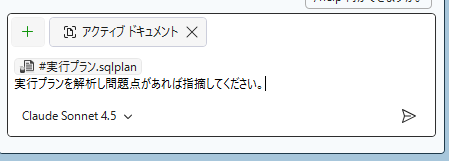
Yes. Either open a saved plan, or after capturing a plan in SSMS (using Query > Include Actual Execution Plan), right-click on the plan and select Show Execution Plan in New Tab. With the query editor tab as the active tab, in the chat window use # to bring up the open document list. Select the execution plan from the list, then enter your prompt ("analyze the execution plan and make recommendations for improvements").
SSMS 22 では、表示されている実行プランを「新しいタブに実行プランを表示」で、新しいドキュメントとして開くことができるようになりました。
新しいタブに開いた実行プランですが、# 記号を使用してファイル参照を追加 することで GitHub Copilot チャットのコンテキストに含めることができます。
これにより、実行プランを対象としてプロンプトを実行することができます。
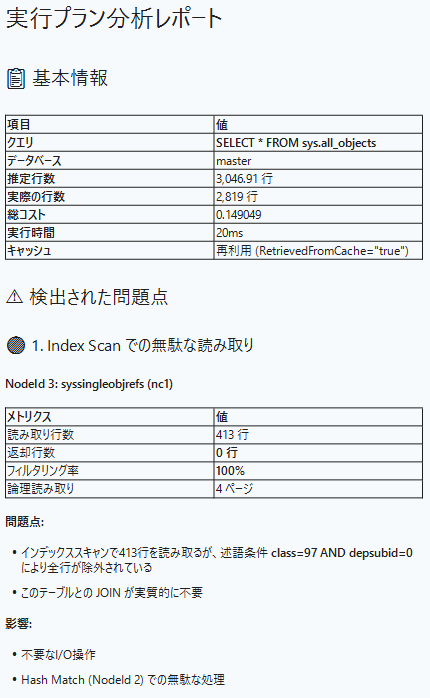
実際に解析した結果が次の内容となりますが、このようなレポートを GitHub Copilot で作成することができます。
今回は「実際の実行プランを表示 -> 新しいタブに実行プランを表示」で表示した実行プランの .sqlplan を対象としましたが、同様の操作を推定実行プランで実施 / プランキャッシュやクエリストアの実行プランの XML を開いて表示した .sqlplan といった内容でも同様に # でコンテキストに追加することができます。
この方法は汎用性が高く、実行プランの解析に高頻度で活用できそうですね。