SE の雑記

SQL Server の情報をメインに Microsoft 製品の勉強内容を日々投稿

Archive for the ‘Windows Server’ Category

Nano Server をセットアップしようとして四苦八苦していた件

leave a comment

作業の合間に Nano Server をセットアップしようとしていて、下のエラーが出て失敗したのかと思ったらそうでもなかったりしていた件についてメモを。

image

いろいろな方に情報をいただいて最終的には起動しました。
ご助言くださった方々、本当にありがとうございます!!

Nano Server のインストール方法については以下を参考にさせていただいています。

山市良版 Getting Started with Nano Server
Getting Started with Nano Server
Nano Server 取りあえずやってみた
Read the rest of this entry »

Written by Masayuki.Ozawa

5月 18th, 2015 at 5:13 pm

Posted in Windows Server

Tagged with

イベントビューアーの除外フィルターの設定について

leave a comment

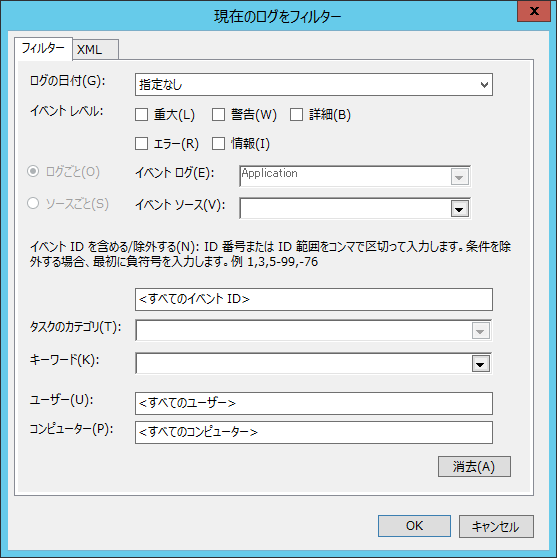
イベントビューアーには現在のログをフィルターする機能があり、どのイベントを表示するかのフィルターを設定することができます。
image

Read the rest of this entry »

Written by Masayuki.Ozawa

5月 17th, 2015 at 11:17 pm

Posted in Windows Server

Tagged with

Windows Server Technical Preview の WSFC の Cloud Witness

leave a comment

Windows Server Technical Preview の新機能に関しては、What’s New in the Windows Server Technical Preview に記載されています。

ここにかかれているかが見つけられていないのですが WSFC で興味深い機能があったのでご紹介を。
What’s New in Failover Clustering in Windows Server Technical Preview に見当たらなかったのですよね。

Read the rest of this entry »

Written by Masayuki.Ozawa

10月 3rd, 2014 at 9:32 pm

Windows 10 の情報を追う際のメモ

leave a comment

あとで Windows 10 の情報を追う際のメモを。
二大先生のブログがとても参考になります。
ブチザッキ : Windows 10
tech.guitarrapc.com : Announcing Windows 10 and Tech Preview

ダウンロードできるかの確認は http://preview.windows.com から。
英語の情報では Announcing Windows 10 がクライアント OS、An early look at the future of the datacenter from Microsoft がサーバー OS  の情報を追うのによいようです。

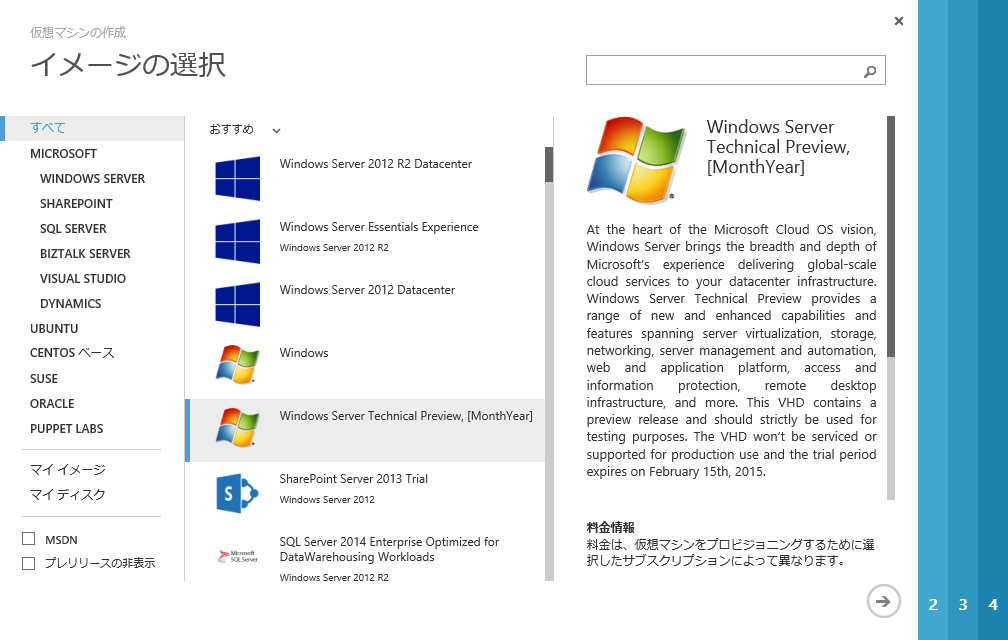
ちなみに、先ほど Azure の仮想マシンに [Windows Server Technical Preview, [MonthYear]] が来ていたのでひゃっほーと思ってデプロイしたところ、先ほどのタイミングでは 2008 R2 でした。
確かにアイコンは 2008 R2 ですね。
image

仕事終わったら情報見始めようと。

Read the rest of this entry »

Written by Masayuki.Ozawa

10月 1st, 2014 at 3:52 pm

Windows Server 2012 R2 に August 2014 Update を適用

leave a comment

以前からアナウンスされていましたが、本日 Windows 8.1 / Windows Server 2012 R2 に August Update が提供されました。
August 2014 update rollup for Windows RT 8.1, Windows 8.1, and Windows Server 2012 R2

モジュールは以下からダウンロードできます。
# 8.1 x64 と 2012 R2 は同じモジュールがダウンロードできるようですが。

Windows 8.1 用更新プログラム (KB2975719)
Windows 8.1 for x64-Based Systems 用更新プログラム (KB2975719)
Windows Server 2012 R2 用更新プログラム (KB2975719)

Read the rest of this entry »

Written by Masayuki.Ozawa

8月 13th, 2014 at 6:32 pm

Posted in Windows Server

Tagged with

PowerShell スクリプトをクラスターリソースとして登録

leave a comment

WSFC ではスクリプトをリソースとして登録するための [汎用スクリプト] があります。
このリソースですが Windows Scripting Host (WSH) を実行するためのリソースとなるため、PowerShell スクリプトを実行することができません。
image

既存資産を使用する場合は、WSH ベースの汎用スクリプトを使用してもいいと思いますが、新規にスクリプトを作成する場合は、PowerShell でスクリプトを書いたほうが効率的ですので、今回の投稿ではクラスターリソースとして PowerShell スクリプトを登録する方法を。

Read the rest of this entry »

Written by Masayuki.Ozawa

7月 24th, 2014 at 10:03 pm

Posted in Windows Server

Tagged with

ファイル共有監視で動的なクォーラム監視を使う

leave a comment

AlwaysOn 可用性グループの検証用に Windows Server 2012 R2 の WSFC を構築していたところ、クラスタークォーラムの設定で以下のような画面が表示されていました。
image

ファイル共有監視で動的なクォーラム (Dynamic Quorum) が構成されるかどうか覚えていなかったので少しまとめてみたいと思います。
検証した限りでは動的なクォーラムは動作していそうでした。

Read the rest of this entry »

Written by Masayuki.Ozawa

7月 16th, 2014 at 2:25 pm

Posted in Windows Server

Tagged with

Windows Server 2008 R2 でその他のマイクロソフト製品の更新プログラムを入手する

leave a comment

タイトルの通りですが、Windows Update では OS 以外 (Office 等) のマイクロソフト製品の更新プログラムを入手することができます。
image

Read the rest of this entry »

Written by Masayuki.Ozawa

7月 3rd, 2014 at 11:53 am

Windows Server 2012 R2 で GUI でライセンスサーバーを指定した場合の反映タイミング

leave a comment

HKEY_LOCAL_MACHINESYSTEMCurrentControlSetServicesTermServiceParametersLicenseServersWindows Server 2012 / 2012 R2 ではワークグループ環境の場合、 Windows Server 2012 リモート デスクトップ環境の構成について に記載されているように WMI やレジストリをからリモートデスクトップサービスの設定を行うことができます。

ドメインに参加している場合は、サーバーマネージャーからリモートデスクトップサービスを開き、展開プロパティの編集からライセンスサーバーを設定することができます
imageimage

Read the rest of this entry »

Written by Masayuki.Ozawa

5月 16th, 2014 at 12:29 pm

イベントログのサブスクリプションのイベント配信のカスタマイズ

leave a comment

以前、イベントサブスクリプションでイベントログを再送する という投稿を書きましたがこの続きのような感じで。
Read the rest of this entry »

Written by Masayuki.Ozawa

5月 9th, 2014 at 12:40 pm

Posted in Windows Server

Tagged with