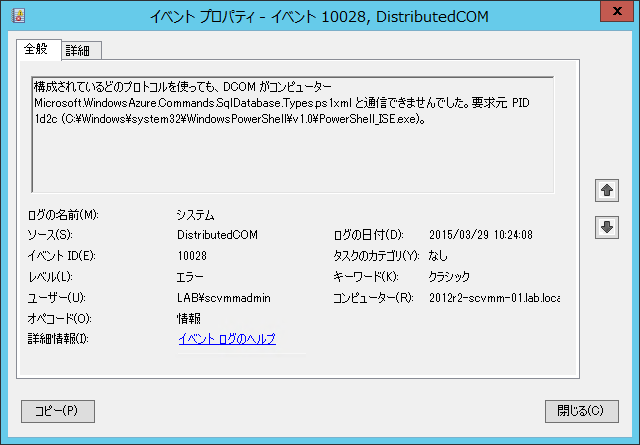
Azure PowerShell をインストールしている環境で「Import-Module SQLPS」を実行すると以下の警告が発生することがあります。
警告: SQL Server サービスの情報を取得できませんでした。'Microsoft.WindowsAzure.Commands.SqlDatabase.Types.ps1xml' の WMI への接続が次のエラーで失敗しました: RPC サーバーを利用できません。 (HRESULT からの例外:0x800706BA)
警告: SQL Server サービスの情報を取得できませんでした。'Microsoft.WindowsAzure.Commands.SqlDatabase.Types.ps1xml' の WMI への接続が次のエラーで失敗しました: RPC サーバーを利用できません。 (HRESULT からの例外:0x800706BA)
警告: SQL Server サービスの情報を取得できませんでした。'Microsoft.WindowsAzure.Commands.SqlDatabase.Types.ps1xml' の WMI への接続が次のエラーで失敗しました: RPC サーバーを利用できません。 (HRESULT からの例外:0x800706BA)
警告: SQL Server サービスの情報を取得できませんでした。'Microsoft.WindowsAzure.Commands.SqlDatabase.Types.ps1xml' の WMI への接続が次のエラーで失敗しました: RPC サーバーを利用できません。 (HRESULT からの例外:0x800706BA)
警告: SQL Server サービスの情報を取得できませんでした。'Microsoft.WindowsAzure.Commands.SqlDatabase.Types.ps1xml' の WMI への接続が次のエラーで失敗しました: RPC サーバーを利用できません。 (HRESULT からの例外:0x800706BA)
警告: SQL Server サービスの情報を取得できませんでした。'Microsoft.WindowsAzure.Commands.SqlDatabase.dll' の WMI への接続が次のエラーで失敗しました: RPC サーバーを利用できません。 (HRESULT からの例外:0x800706BA)
警告: SQL Server サービスの情報を取得できませんでした。'Microsoft.WindowsAzure.Commands.SqlDatabase.dll' の WMI への接続が次のエラーで失敗しました: RPC サーバーを利用できません。 (HRESULT からの例外:0x800706BA)
警告: SQL Server サービスの情報を取得できませんでした。'Microsoft.WindowsAzure.Commands.SqlDatabase.dll' の WMI への接続が次のエラーで失敗しました: RPC サーバーを利用できません。 (HRESULT からの例外:0x800706BA)
警告: SQL Server サービスの情報を取得できませんでした。'Microsoft.WindowsAzure.Commands.SqlDatabase.dll' の WMI への接続が次のエラーで失敗しました: RPC サーバーを利用できません。 (HRESULT からの例外:0x800706BA)
警告: SQL Server サービスの情報を取得できませんでした。'Microsoft.WindowsAzure.Commands.SqlDatabase.dll' の WMI への接続が次のエラーで失敗しました: RPC サーバーを利用できません。 (HRESULT からの例外:0x800706BA)
こちらですが、冒頭で紹介したフォーラムの内容によると不具合のようですね。
Import-Module SQLPS を実行した際に「Azure.psd1」が読み込まれているのですが、このファイルの中の
- Microsoft.WindowsAzure.Commands.SqlDatabase.Types.ps1xm
- Microsoft.WindowsAzure.Commands.SqlDatabase.dll
の箇所が起因して警告となっているようです。
そのため、「C:\Program Files (x86)\Microsoft SDKs\Azure\PowerShell\ServiceManagement\Azure\Azure.psd1」の上記を使用している個所を以下のようにコメント化することで、警告の発生を抑止することができます。
# Type files (.ps1xml) to be loaded when importing this module
TypesToProcess = @(
    '.\Services\Microsoft.WindowsAzure.Commands.Websites.Types.ps1xml',
#    '.\Sql\Microsoft.WindowsAzure.Commands.SqlDatabase.Types.ps1xml'
    '.\Storage\Microsoft.WindowsAzure.Commands.Storage.Types.ps1xml'
)
# Modules to import as nested modules of the module specified in ModuleToProcess
NestedModules = '.\Services\Microsoft.WindowsAzure.Commands.dll',
                '.\Automation\Microsoft.Azure.Commands.Automation.dll',
                '.\TrafficManager\Microsoft.WindowsAzure.Commands.TrafficManager.dll',
                '.\Services\Microsoft.WindowsAzure.Commands.Profile.dll',
                '.\Compute\Microsoft.WindowsAzure.Commands.ServiceManagement.dll',
#                '.\Sql\Microsoft.WindowsAzure.Commands.SqlDatabase.dll',
                '.\Storage\Microsoft.WindowsAzure.Commands.Storage.dll',
                '.\ManagedCache\Microsoft.Azure.Commands.ManagedCache.dll',
                '.\HDInsight\Microsoft.WindowsAzure.Commands.HDInsight.dll',
                '.\Network\Microsoft.Azure.Commands.Network.dll',
                '.\StorSimple\Microsoft.WindowsAzure.Commands.StorSimple.dll',
                '.\RecoveryServices\Microsoft.Azure.Commands.RecoveryServices.dll'
警告が発生するだけであれば、警告を無視してしまえばよいのですが、イベントビューアーに「DistributedCOM」「10028」のエラーが出力されているため、イベントビューアーのログ確認をしている場合などに影響が出る可能性があるかと思いますので、この警告が出力されてしまっている場合は、注意したほうがよいかと。