仮想環境を使用して、AD を使用しない Azure Local の構築をした際のメモを。
Contents
Azure Local 2510 の新機能
2510 の機能と機能強化 に記載されていますが、Azure Local 2510 では、初期の構成に関する次の機能が追加されています
ローカルラック対応クラスタリングは 2510 で新しく追加された機能となりますが、Key Vault でローカル ID を使用した AD を使用しない構成については、以前は限定的なプレビューとして公開されていたものとなりますが、2510 でパブリックプレビューとして公開され、特別な申請をしなくても使用することができるようになりました。
本投稿は、Azure Key Vault でローカル ID を使用して Azure Local をデプロイする (プレビュー) を仮想環境で 1 ノードで構築した場合のメモとなります。
構築のポイント
基本的な構築の流れについては次のドキュメントの内容となります
- Azure ローカル デプロイについて
- Azure Key Vault でローカル ID を使用して Azure Local をデプロイする (プレビュー)
- 仮想 Azure ローカル システムをデプロイする
AD を使用しない構成のポイントとなる部分のみ、本投稿で記載しておきたいと思います。
インスタンス作成時の ID プロバイダー
AD を使用しない構成については、ID プロバイダーとして「Azure Key Vault」を使用した構成となります。
この構成については展開時に選択をすることができます。
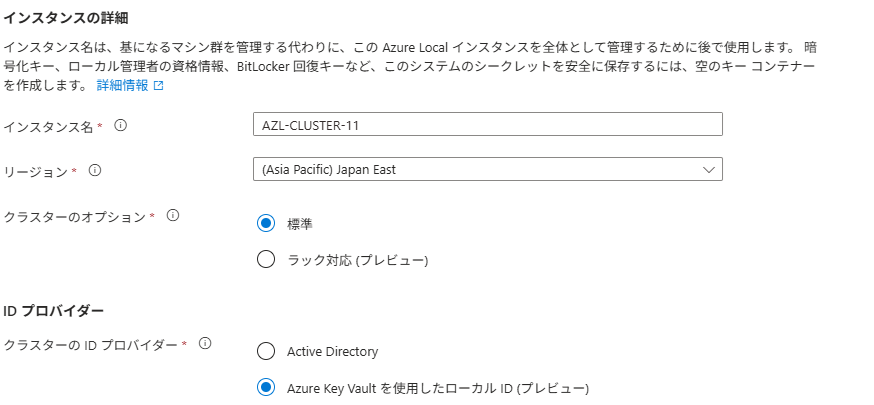
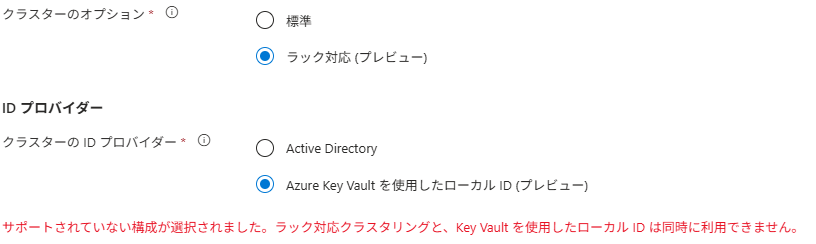
「ラック対応」と「」Azure Key Vault を使用したローカル ID」は現状、排他の設定となっているようで、ラック対応を使用する場合、AD を使用する必要があるようです。
仮想マシン展開時のディスク構成考慮点
仮想 Azure ローカル システムをデプロイする に要件として次の記載があります。
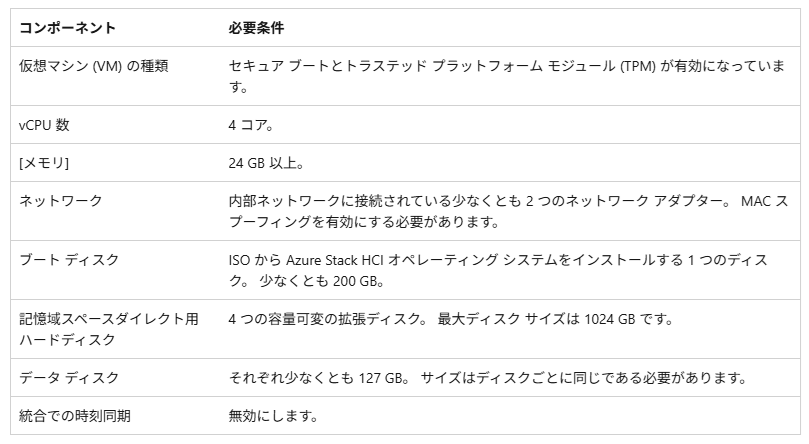
データディスクについては 127GB × 4 本で構成できるように読めますが、2510 時点ではこの構成にした場合、次の 2 つのエラーが発生します。
投稿を作成している時点では、127GBのディスクで構築する場合、6 本で構成しておいたほうがよさそうです。
検証時のエラー
検証時の「Azure Stack HCI Storage Validation」で次のエラーが発生する可能性があります。

Storage Pool Capacity is 169.333333333023 GB; Expected >= 500 GB. (Cluster pattern: ‘Standard’, ResiliencySettingName: ‘Mirror’, PhysicalDiskRedundancy ‘2’)
これは、 2510 時点の問題であり、2511 では解決されるようです。
仮想展開の場合、127GB × 4 本で構成できるのが本来想定される動作となりますが、2510 では 3 方向ミラーで 500 GB 以上の容量を確保できるかの検証が行われてしまうことで、エラーとなってしまっています。
これを回避するには、エラーが発生した後に次のスクリプトを実行し、ストレージプールのキャパシティの検証をスキップする設定を行ったうえで再試行する
必要があるようです。
$Module = Get-Module AzStackHci.EnvironmentChecker -ListAvailable | Sort-Object Version -Descending | Select-Object -first 1;
@("Test-StoragePoolCapacity") | Out-File (Join-Path -Path $module.ModuleBase -ChildPath ExcludeTests.txt)
上記のスクリプトを実行してから Azure Portal から検証を再試行するとエラーを回避することができ、仮想環境の要件の構成で構築を行うことができます。

展開時のエラー
上述の対応を実施することで、127GB × 4 本のディスク構成で検証をスキップすることができます。
しかし、この構成では展開時の「Config storage」で次のエラーが発生しました。

Type ‘ConfigStorage’ of Role ‘Storage’ raised an exception: Failed to configure storage on cluster AZL-11-11/09/2025 03:57:22: Failed to create virtual disk after ‘5’ attempts. At C:\NugetStore\Microsoft.AzureStack.Fabric.Storage.SCPSModule.10.2510.1001.1027\content\CloudDeployment\Roles\Common\CSCommon.psm1:121 char:9 + throw "$env:COMPUTERNAME-$([DateTime]::Now.ToUniversalTime()) … + ~~~~~~~~~~~~~~~~~~~~~~~~~~~~~~~~~~~~~~~~~~~~~~~~~~~~~~~~~~~~~ + CategoryInfo : OperationStopped: (AZL-11-11/09/20…r ‘5’ attempts.:String) [], RuntimeException + FullyQualifiedErrorId : AZL-11-11/09/2025 03:57:22: Failed to create virtual disk after ‘5’ attempts. at Set-SCStorageSystem, C:\NugetStore\Microsoft.AzureStack.Fabric.Storage.SCPSModule.10.2510.1001.1027\content\JEAModules\Microsoft.AzureStack.Fabric.Storage.10.2510.1001.1027\Microsoft.AzureStack.Fabric.Storage.Deploy.psm1: line 553 at ConfigStorage, C:\NugetStore\Microsoft.AzureStack.Fabric.Storage.SCPSModule.10.2510.1001.1027\content\CloudDeployment\Classes\Storage\Storage.psm1: line 251 at <ScriptBlock>, C:\CloudDeployment\ECEngine\InvokeInterfaceInternal.psm1: line 165 at Invoke-EceInterfaceInternal, C:\CloudDeployment\ECEngine\InvokeInterfaceInternal.psm1: line 160 at <ScriptBlock>, <No file>: line 50
例外の内容では、どのような理由によりエラーとなったのかが判断できないのですが、Azure Local の「C:\CloudDeployment\Logs」の「CloudDeployment.yyyy-MM-dd.hh-mm-ss.f」のログからエラーの内容を判断することができます。
Activity ID: {808a1123-5129-0002-ba13-8a802951dc01}
2025-11-09 03:55:30 Verbose [Storage:ConfigStorage] AZL-11-11/09/2025 03:55:30: [ERROR] Failed to create virtual disk after ‘5’ attempts.2025-11-09 03:55:30 Verbose [Storage:ConfigStorage] AZL-11-11/09/2025 03:55:30: Attempt #1 create volume Infrastructure_1 failed AZL-11-11/09/2025 03:55:30: Failed to create virtual disk after ‘5’ attempts.
2025-11-09 03:56:00 Verbose [Storage:ConfigStorage] AZL-11-11/09/2025 03:56:00: Creating volume Infrastructure_1 – Size: 250 GB, Resiliency: Mirror, Redundancy: 1, ProvisioningType: Fixed
2025-11-09 03:56:00 Verbose [Storage:ConfigStorage] Perform operation ‘Query CimInstances’ with following parameters, ”queryExpression’ = SELECT * FROM MSFT_StoragePool WHERE UniqueId = ‘{4d11db16-cea4-47de-91b3-5d0655725173}’,’queryDialect’ = WQL,’namespaceName’ = root/Microsoft/Windows/Storage’.
2025-11-09 03:56:00 Verbose [Storage:ConfigStorage] Operation ‘Query CimInstances’ complete.
2025-11-09 03:56:00 Verbose [Storage:ConfigStorage] AZL-11-11/09/2025 03:56:00: Create volume ‘Infrastructure_1’
2025-11-09 03:56:00 Verbose [Storage:ConfigStorage] Connecting to cluster on local computer AZL-11.
2025-11-09 03:56:00 Verbose [Storage:ConfigStorage] AZL-11-11/09/2025 03:56:00: Available Storage owner is ‘AZL-11’
2025-11-09 03:56:00 Verbose [Storage:ConfigStorage] AZL-11-11/09/2025 03:56:00: Getting non-primordial storage pool attempt ‘1’
2025-11-09 03:56:00 Verbose [Storage:ConfigStorage] AZL-11-11/09/2025 03:56:00: Using storage pool ‘SU1_Pool’ with uniqueId ‘{4d11db16-cea4-47de-91b3-5d0655725173}’
2025-11-09 03:56:00 Verbose [Storage:ConfigStorage] AZL-11-11/09/2025 03:56:00: Creating virtual disk attempt ‘1’ with parameters
Name Value
—- —–
FriendlyName Infrastructure_1
PhysicalDiskRedundancy 1
StoragePoolUniqueId {4d11db16-cea4-47de-91b3-5d0655725173}
ProvisioningType Fixed
AllocationUnitSize 1073741824
ResiliencySettingName Mirror
Size 268435456000
2025-11-09 03:56:01 Verbose [Storage:ConfigStorage] AZL-11-11/09/2025 03:56:01: [WARNING] Failed to create virtual disk. Error: Not Supported
Extended information:The storage pool does not have sufficient eligible resources for the creation of the specified virtual disk.
Recommended Actions:– Choose a combination of FaultDomainAwareness and NumberOfDataCopies (or PhysicalDiskRedundancy) supported by the storage pool.
– Choose a value for NumberOfColumns that is less than or equal to the number of physical disks in the storage fault domain selected for the virtual disk.
エラー内容としてはボリューム用に 250GB の領域を確保しようとしたが、搭載したディスクでは容量が不足してエラーとなっているような感じなのでしょうか。
前述のとおり、127GB×4本ではなく127GB×6 本で構成しておけば容量は問題ないようです。
本事象が発生した場合、すでに途中まで構築は進んでしまっているため、一から再構築したほうがよさそうでした。
127GB × 6 本で構築した場合、次のような仮想ディスクの割り当てとなっていましたので、この程度の容量は確保できるようにしておくとよさそうでした。
